How to Clear RDP Connection History in Windows
Remove the list of servers that Remote Desktop remembers: registry entries, the hidden Default.rdp file, saved passwords and the taskbar list.
2 min readBy Daniel
Reviewed by the AmazingRDP technical team
Looking for a remote desktop to connect to? See our RDP plans. See Cheap RDP from $4.99
The Remote Desktop Connection program remembers every server you connect to. The addresses appear in its drop-down list, and Windows keeps the user name you used for each. On a shared or borrowed computer, or before you hand a PC on, you will want that list gone. Windows has no button for it. The history sits in four places, and this guide clears each.
What is stored where
| What | Where |
|---|---|
| The last 10 addresses in the drop-down list | Registry: HKCU\Software\Microsoft\Terminal Server Client\Default |
| Every server ever used, with the user name | Registry: HKCU\Software\Microsoft\Terminal Server Client\Servers |
| Settings of the last connection | Hidden file Default.rdp in your Documents folder |
| Saved passwords | Windows Credential Manager |
| Recent servers on the taskbar icon | The icon's jump list |
1. The drop-down list
Press Win + R, type regedit and press Enter. Go to:
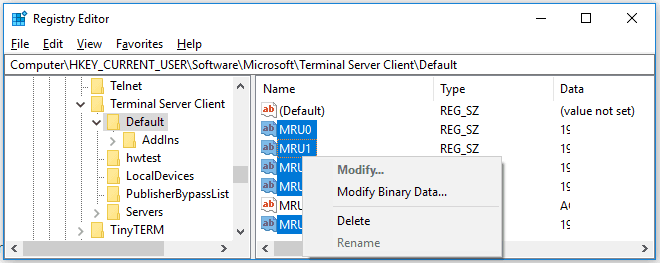
HKEY_CURRENT_USER\Software\Microsoft\Terminal Server Client\DefaultOn the right are values named MRU0 to MRU9, one per remembered address. Select the ones you want to remove, or all of them, right-click and choose Delete.
2. The list of all servers
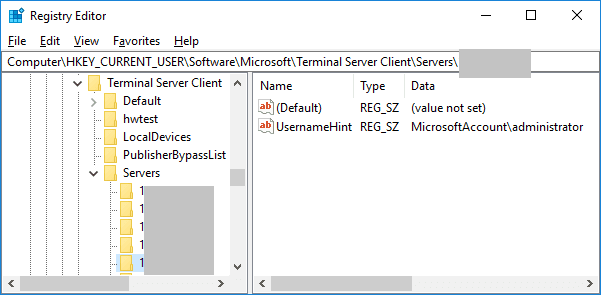
Next to it is the key Servers, with one sub-key per server and a value UsernameHint holding the name you signed in with. The simplest way is to delete the whole Servers key; Windows creates it again at the next connection.
3. The hidden Default.rdp file
Open Command Prompt and run:
del /ah "%USERPROFILE%\Documents\Default.rdp"The /ah part is needed because the file is hidden. If your Documents folder is moved or synchronised to OneDrive, look for the file there.
4. Saved passwords
If you ticked "Remember me", the password is in Credential Manager. Open Control Panel, Credential Manager, Windows Credentials, and remove the entries that begin with TERMSRV/. From the command line:
cmdkey /list
cmdkey /delete:TERMSRV/203.0.113.10
The first line lists what is saved; the second removes one entry.
5. The taskbar jump list
Right-click the Remote Desktop icon on the taskbar. Recent servers are listed there; right-click one and choose Remove from this list.
All at once: a script
Save this as clear-rdp-history.bat and double-click it. It clears the history of the user who runs it:
@echo off
reg delete "HKCU\Software\Microsoft\Terminal Server Client\Default" /va /f
reg delete "HKCU\Software\Microsoft\Terminal Server Client\Servers" /f
reg add "HKCU\Software\Microsoft\Terminal Server Client\Servers" /f
del /ah "%USERPROFILE%\Documents\Default.rdp" 2>nul
for /f "tokens=2 delims==" %%a in ('cmdkey /list ^| findstr /c:"target=TERMSRV"') do cmdkey /delete:%%a
echo RDP history cleared.
Stop Windows from remembering
- Passwords: leave "Remember me" unticked. An administrator can forbid saving with the policy Do not allow passwords to be saved, under Remote Desktop Connection Client in
gpedit.msc. - Addresses: there is no setting for this. Run the script when you finish, or as a logoff script.
What this does not remove
This is your own computer's memory of where you connected. The server keeps its own record of sign-ins in its event log, which only its administrator can see or clear.
Related guides: how to connect to RDP from a desktop and fix copy and paste in a Remote Desktop session. For a remote desktop of your own, see our RDP plans.
Questions
Where is the RDP connection history stored?
In the registry under HKCU\Software\Microsoft\Terminal Server Client, in the keys Default and Servers, and in the hidden file Default.rdp.
How do I remove one server from the Remote Desktop list?
Delete its MRU value under the Default key and its sub-key under Servers.
How do I delete saved RDP passwords?
Open Credential Manager and remove the entries beginning with TERMSRV/, or use cmdkey /delete.
Does clearing the history remove logs on the server?
No. The server keeps its own sign-in log.