Fix: IDM Extension Is Not Shown in the Chrome Extensions List
IDM Integration Module missing from Chrome? Update IDM, switch on Chrome integration, then add the genuine extension from IDM's own link or its CRX file.
2 min readBy Soumya
Reviewed by the AmazingRDP technical team
Installing software like IDM needs administrator rights. An admin RDP gives you a Windows desktop with full admin access. See Admin RDP from $9.99
Internet Download Manager (IDM) catches downloads in Chrome through an extension called IDM Integration Module. When that extension is missing from chrome://extensions, IDM stops taking over downloads and the "Download this video" panel disappears. Here is how to put the genuine extension back.
First: do not search the Chrome Web Store for it
IDM's makers say that the IDM extensions you find by searching the store are fakes. The genuine extension is hidden from search on purpose, because it does nothing without the IDM program. It can only be reached by its direct link or installed from the IDM folder. If you added an "IDM" extension from a store search, remove it before you continue.
1. Update IDM
An old IDM version is the most common reason the extension goes missing after a Chrome update. In IDM, open Help, then Check for updates, install the update and restart the computer if asked.
2. Switch on Chrome integration in IDM
- In IDM, open Options (Downloads, Options).
- On the General tab, tick Use advanced browser integration.
- In the list of browsers below, tick Google Chrome and click OK.
- Close Chrome completely and open it again.
Often this alone brings the extension back: Chrome shows a notice that a new extension was added, and you only have to enable it.
3. Add the genuine extension with IDM's direct link
If the extension is still missing, open IDM's own help page for Chrome integration on internetdownloadmanager.com. It gives the direct Chrome Web Store link to the genuine extension.
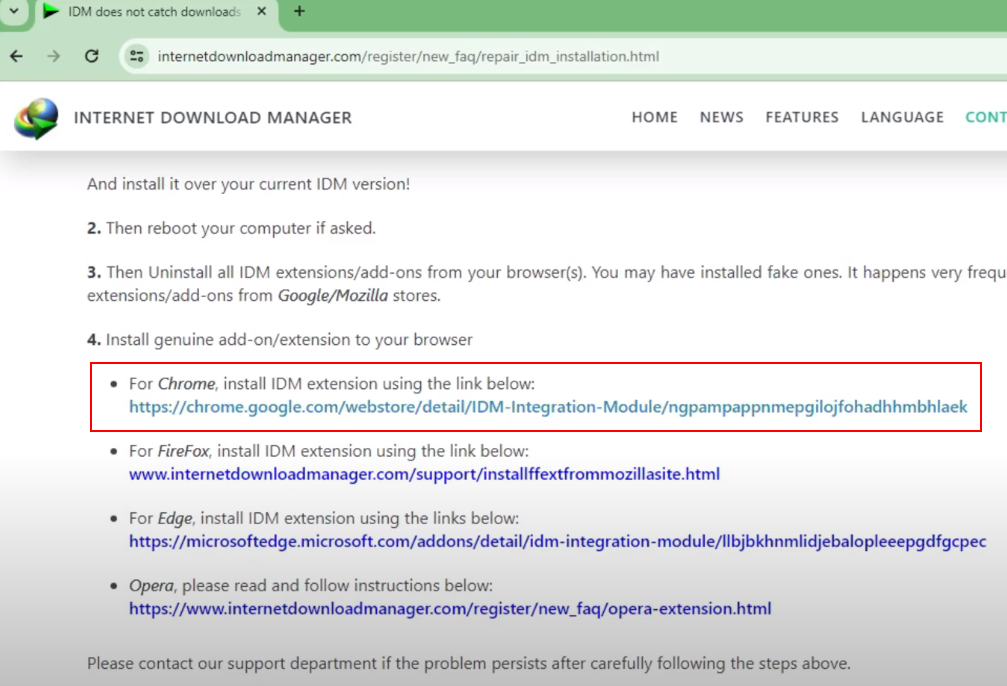
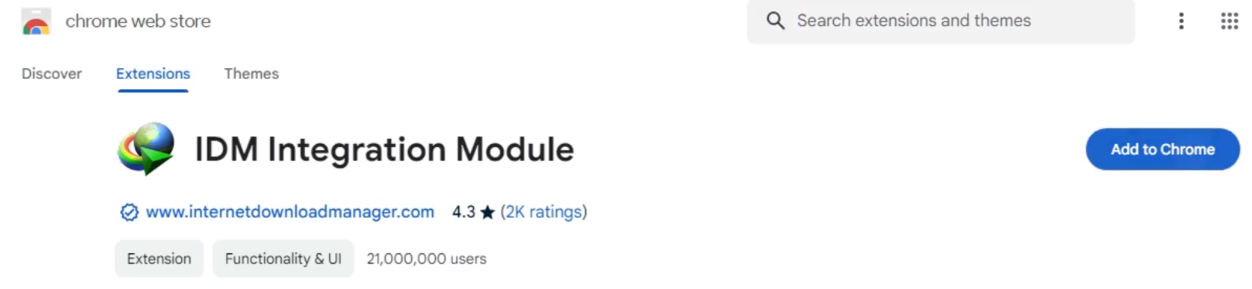
The link opens the store page of IDM Integration Module. Before you click, check that the publisher shown under the name is www.internetdownloadmanager.com. Then click Add to Chrome.
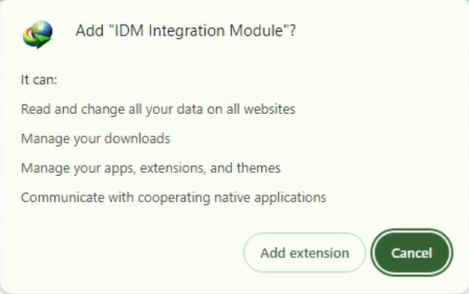
Chrome asks for confirmation. Click Add extension.
4. Or add it from the IDM folder
The extension file also comes with IDM itself:
- In Chrome, open
chrome://extensions. - In File Explorer, open the IDM folder, normally
C:\Program Files (x86)\Internet Download Manager. - Find the file
IDMGCExt.crx(shown asIDMGCExtif Windows hides file endings). - Drag it onto the Chrome extensions page and click Add extension.
5. Check the extension's settings
On chrome://extensions, find IDM Integration Module and click Details:
- The switch at the top is on.
- Site access is set to On all sites. Without it IDM cannot see downloads.
- Allow in Incognito is on, if you use incognito windows.
If it still does not work
- Chrome started as administrator. IDM's integration may not work then. Start Chrome normally.
- Another extension is in the way. Switch the others off one at a time, download managers and ad blockers first.
- Old data. Clear Chrome's cache and try again.
- Clean reinstall. Uninstall IDM, restart, install the newest version from the official site, then repeat steps 2 to 5.
IDM on a remote desktop
IDM is a Windows program and installing it needs administrator rights. On a shared RDP you cannot install it; on an admin RDP you can, and the steps above are the same. See also how to fix copy and paste in RDP for moving links between your computer and the remote desktop, and how to export cookies in Google Chrome.
Questions
Why is the IDM extension not in my Chrome extensions list?
Usually IDM is out of date, Chrome integration is switched off in IDM's options, or the extension was removed. Update IDM, enable the integration and add the extension again.
Is the IDM extension in the Chrome Web Store search genuine?
No. IDM's makers say the ones found by search are fakes. The genuine "IDM Integration Module" is hidden from search and reached only by the direct link from IDM's site.
Where is the IDMGCExt.crx file?
In the IDM installation folder, normally C:\Program Files (x86)\Internet Download Manager.
Will I lose my downloads if I reinstall the extension?
No. The download list and settings are kept by the IDM program, not by the extension.