Setting Up a VPN and Adding a Server Key in Webmin
Manage an OpenVPN server from Webmin on Ubuntu: install the packages and the module, create the certificate authority, the server key and client keys.
3 min readBy Smita
Reviewed by the AmazingRDP technical team

A private VPN for yourself or your team runs well on a small Linux VPS with root access. See Linux VPS from $6.99
Webmin is a free web interface for administering a Linux server. OpenVPN is a widely used VPN server. Webmin does not manage OpenVPN out of the box, but a community module adds pages for the part most people find hardest: creating the certificate authority and the keys. This guide follows that route on Ubuntu 22.04.
Before you start
- An Ubuntu server with Webmin installed and a user with sudo rights.
- The "OpenVPN + CA" module is made by a volunteer, not by the Webmin team, and has not been updated for years. It still works for creating keys, with the one fix in step 3. Read its repository page before you install it.
- On our plans, VPN software is allowed on VPS and dedicated servers for your own use. It must not be left open for anyone to use, and you are responsible for the traffic.
1. Install OpenVPN and Easy-RSA
sudo apt update
sudo apt install openvpn easy-rsa
2. Install the Webmin module
- Download the module file (ending in
.wbm.gz) from its GitHub repository; the module's old website is no longer online. - In Webmin, open Webmin, Webmin Configuration, Webmin Modules.
- Choose From uploaded file, select the file and click Install Module.
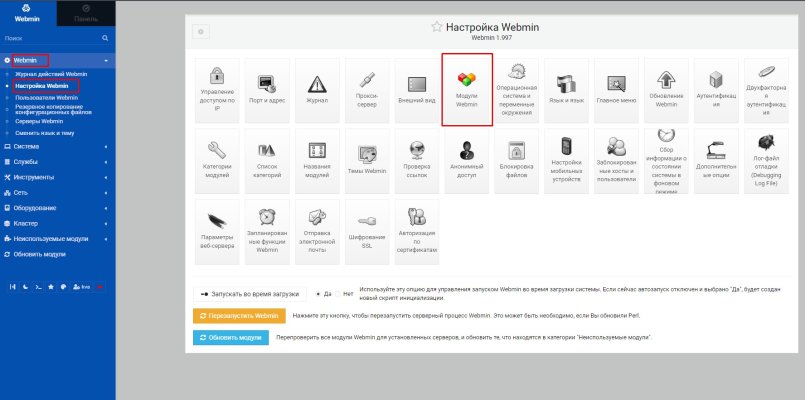
The module then appears under Servers as OpenVPN + CA.
3. Change the signature method before creating anything
The module signs certificates with MD5 by default. Current OpenVPN clients refuse those as too weak. Open the module's SSL configuration:
sudo nano /etc/openvpn/openvpn-ssl.cnfFind the line default_md = md5 and change it to:
default_md = sha256Do this first: certificates created before the change keep the weak signature and must be made again.
4. Create the certificate authority
The certificate authority (CA) is the key that signs all others; server and clients trust each other because both were signed by it.
- Open OpenVPN + CA, then Certification Authority List.
- Replace the placeholder name
changemewith a name of your own, and fill in the organisation fields as you like. - Choose a key size of at least 2048 bits and save. Creating it can take a minute.
5. Create the server key
- Open the Keys list of your new CA.
- Under the new-key form, set the key type to Server, name it (for example
server), and leave the password empty, so that the VPN can start without someone typing it. - Save.
6. Create a key for each client
- In the same list, create a key of type Client for each person or device, with a clear name.
- Set a password on client keys. A stolen laptop then does not hand over the VPN.
One key per device. If a device is lost, you revoke its key and nobody else is affected.
7. Create the VPN server and hand out the client files
Open VPN List, create a new VPN server and select your CA and the server key. Then add each client to it, choosing its client key. The module builds a package for each client with its key, certificate and settings file; import that into the OpenVPN client program on the device.
8. Open the port, and protect Webmin itself
sudo ufw allow 1194/udpUse the port and protocol you chose for the VPN server. Webmin's own port, 10000, is a favourite target of attackers. Once the VPN works, close it to the internet and reach Webmin through the VPN or an SSH tunnel.
A simpler alternative
If all you need is a private VPN for a few devices, WireGuard has far less to configure: no certificate authority, one short key pair per device. OpenVPN is the choice when you need its wider compatibility or per-user certificates.
A small Linux VPS is enough for a personal VPN. Related guides: configure a static IP on Ubuntu Server and fix "sudo: command not found" in Linux.
Questions
Does Webmin include an OpenVPN module?
Not by default. A community module called "OpenVPN + CA" adds it and is installed from a file.
Why does the OpenVPN client complain about a weak certificate?
The module signs with MD5 by default. Change default_md to sha256 in /etc/openvpn/openvpn-ssl.cnf and create the certificates again.
Should the server key have a password?
No, or the VPN cannot start by itself. Client keys should have one.
Which port does OpenVPN use?
UDP port 1194 by default. You can choose another when creating the server.